Featured

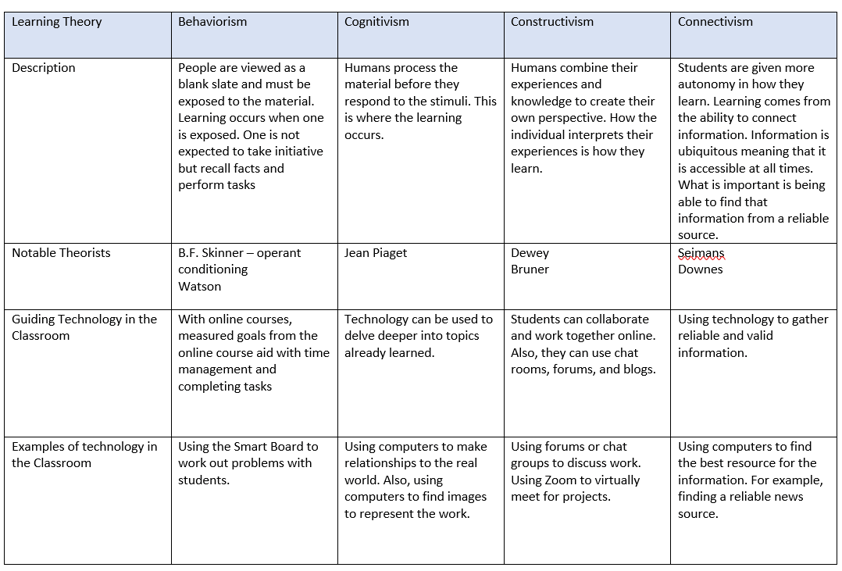
Learning Theories

This matrix was a great review and introduction to these learning theories! The resources give to us were sufficient for me to complete this project. The biggest challenge for me was to figure out how to create this matrix however, once I did a little research I was on my way!

These theories will definitely impact my professional practice, especially the Connectivism theory. I strongly believe that since information is readily available, students need to know how to responsibly use the technology. I have noticed that in my classroom students are constantly on their phones but they are on games or a social media site. They are exposed to a surplus of information but I want to help them discover reliable and valid sources for their information.

Given the resources, I would like to implement more technology in the classroom. Using computers that allow the students to explore and work together create more responsible users of technology.

Lesson Deployment App

I used NearPod to create this lesson. NearPod is an interactive slideshow that the teacher can edit to become engaging and fun. The teacher can add quick quizzes to assess student understanding, polls to gather information, and open ended questions for the students to share their thoughts. NearPod can benefit all types of students because there are multiple interactive tools that may be applied which is different than the traditional powerpoint that the teacher reads off of and students take notes. Additionally, the teacher can decide if they want to pace the students or allow students to work at their own pace giving the teacher more control of how to pace the lesson.

Students can benefit from this because it is more engaging than normal lessons. Also, because it can be self-paced, the student can go at their own speed and not feel pressured to move on or get left behind not understanding something. Additionally, a student who is not likely to speak out loud in class, they can still participate in the open responses where they can share their opinion.

This is actually a simple program to use. It has a decent math input program, it can just take some time to scroll through the different symbols and the buttons are not as reactive as I would like but it has a math keyboard so I really cannot complain. Other than that, I really did not have any other struggles using this.

To access the NearPod I created, please visit Nearpod.com/join with the code UZGIA

Thoughtful, Reflective Blog Entry

I truthfully enjoyed this course.  There are so many resources that we discussed that are available to teachers that I had never heard of and I bet there are a ton more.

Here are my 3 biggest takeaways from this course:

  1. Technology can transform your lessons. In my K-12 education most of the lessons taught were notes, copy examples, then I try examples. I  do, we do, you do. That is alright, it is not my preference when learning or teaching. Adding different technologies and resources to the lessons can really make lessons interactive and more enjoyable. Also, technology allows people to ‘visit’ places that they normally would not be able to such as virtual museums, google earth, and virtual aquariums.
  2. Technology can take the pressure off of teachers for grading. Using online assessment platforms can save paper and time. Questions can easily be shuffled, and answer choices can be changed making it less likely for students to cheat off of each other. However, there is still the opportunity for students to use the computer to cheat, but that takes more monitoring. This allows teachers to have more time to prepare more productive and engaging lessons rather than be bogged down with grading.
  3. Technology can make students more productive members of society. We are in an era where things are more technology based and by including technology in the classroom, we can teach students on how to be safe and appropriate users of technology. This is very important because not all students have access to computers or internet at home and if they do not get exposure at school, they will be behind when they begin in the workforce. Additionally, students are born with technology as a part of their lives. Since this is the case, we need to ensure that they understand the risks and can take care of themselves.
  4. I had to add a 4th one, to me this is the most important. Technology can level the playing field for all students! There are so many resources out there to assist students it is insane. For students who struggle handwriting papers, they can type them. For students who cannot write out their work, there are programs that can allow them to speak their thoughts and ideas. For students who do not like speaking in front of the class, they can make a video, a screencast, or participate in online class discussion to share their thoughts. Technology can easily differentiate learning by tiering work or allowing students to work on different platforms. Students who miss school for various reasons can have access to an online classroom, so they are not behind. There is a difference between equality and equity. Technology can aid in equity for all students.

My favorite activity that we worked on was the video production. I really enjoying learning how to piece together a video and love watching classmates’ videos. The video I created was one of my son, but after watching classmates videos I realized the opportunity there is in video creation. Creating a video can easily explain classroom rules, procedures, or introduce yourself to parents and students.

In the future, I definitely plan on using technology in my classroom. I hope to be able to have access to computers for all students in the future, but I am not sure how realistic that is. I really am hoping that with school closures the schools look more into providing devices to all students. I would love to be at a 1 to 1 ratio.

The technology I intend to implement in my classroom in the future includes:

  1. NearPod. After I was able to explore and experiment more with NearPod I have learned to love it. Given the proper resources it can be interactive and engaging for the students. By allowing the teacher to decide if they want the student to proceed at their own pace or for the class to stay together gives the teacher more control. It can also increase participation because you can create anonymous questions where the students can type their answers. Students are more inclined to participate because there is no pressure to speak in front of their peers. I plan to include this by having lessons that I can pace during the class period. This will break up the monotony of taking notes and practicing problems. I plan to include interactive slides such as tile match and polls to assess student understanding as the lesson is going on. I love that it is instant feedback, so you do not have to wait until the end of the lesson for an exit slip to see if the students understood.
  2. I want to incorporate Google Classroom into my teaching. I hate how I will print out papers, quizzes, and tests and have them end up on the floor or in the trash. Google Classroom is a more ecofriendly way to approach school. Also, students can’t say that they lost their document because I know it is online 😊. More seriously, I really enjoy how everything is in one area and there are so many resources with google suite. Collaboration is much more simple on the google platform. Also, I can keep instructions readily available so that students can reread the instructions. I think it will take time to properly establish my Google Classroom, the ones we had for the rest of this semester were kind of rushed and I never had time to make it mine.

I really look forward to how I can implement technology in my classroom and hope the students are receptive to it.

Digital Story Telling

At first, I was hesitant about this project. I am not a fan of recording my voice. However, once I started this, I realized how beneficial this could be in the next few weeks! The topic I chose is the product rule of exponents. This is what my class will be starting with when school resumes the 6th. I am planning on using the video I created as a test to see how the students respond. If I can create simple screen casts to discuss a topic, then I am able to reach out more to my students compared to giving them worksheets to work on without assistance. Also, if a student is struggling, I can screen cast me working and talking through the problem and assist multiple students. This makes it more personable compared to sending the students to a YouTube video which addresses a similar problem. I can be exact and help the students with specific questions.

I have discovered that PowerPoint has a software in which typing math equations is simple and I can animate the slides to have the text appear when I want. This makes the screen cast more effective because the students are not bombarded with all of the information at once.

Virtual Assessment

I am not new to online test taking and virtual assessments, they are ubiquitous in university and secondary schools. However, as a math teacher, I have found it difficult to find a simple platform to type math problems on and now anticipating running my classroom online for the rest of the semester, I was very excited to come across some resources that allowed me to easily insert math equations!

By far the best I have encountered is Formative. Gaston had left a comment that this was great for math, so I had to check it out! Turns out, it is amazing. It is very easy to insert math equations and questions. There is also an option to allow the students to show their work which is essential in math to understand where a student might have made an error. It also forces students to show their work versus doing the work in their head which can lead to mental errors (I know I’m guilty of that!). As I am working on transition to an online classroom, I fully intent to try to use this for my students (that is if they have internet access/the devices required). One thing I would like to comment on is that when required to show work, the student can upload a picture of their work so they are not left to attempt to draw their responses neatly.

To view the assessment I made using this platform visit:

goformative.com/join and enter the code: AWDTVN

The second platform I explored was Socrative. I enjoyed this platform however, math was not as simple to insert in this. It had the option for exponents which will work well for the exponent until but once we hit roots and more intricate problems, this will be a difficult platform to use. What got me to use this platform was the ability to create exit tickets and quick questions. I think I need to explore a bit more, but I had difficulty making one. But, theoretically, it would be a nice quick check. During a lesson, I could direct the students to this site and ask them to answer the question. I will get instant results which is way quicker than walking around the classroom checking each students answer, or receiving 50+ exit slips each day to grade/look over. Once aspect I like is the ability to turn the online quiz to a pdf. If I create an assessment and am unable to get computers or a device for that day, I can easily convert the assessment and print it out without messing with the plan for the day.

To view this assessment please visit:

https://b.socrative.com/login/student/

Room Name: Bobbin

Here is a link to the PDF I created (I hope this works)

file:///C:/Users/Danielle/Downloads/Quiz_Exponents.pdf

Video Production

Learning Experience:

This was definitely a learning experience for me! My depth of knowledge of this is when I had to make a video in my high school physics class when technology was nowhere near what it is today. Surprisingly, it was rather simple. My photo editor on my computer already had a movie editing software which is very user friendly.

Challenges:

One of the most challenging things to do was pick a topic! I had no clue which idea to choose. Other than that, I did not really have any challenges, technology made this project rather simple.

Video Production in Teaching:

I can see using this as a fun way for students to share work as a project compared to the usual stand in front of the class and speak. It could also be an alternative option for students who might have a speech disorder or some form of anxiety in terms of speaking in front of the class. There are so many avenues to proceed in creating a video that any student should be able to easily create one.

Evolution of the Web

The technology I used to create this presentation is emaze.com. This is an easy to use, interactive app that allows you to select a template and edit and add as you desire.

While creating this presentation, I had to do some research to discover what is meant by Web 1.0, Web 2.0, and Web 3.0 as these were new topics to me. A simple google search and I was on my way. The most challenging part of this assignment was discovering how to implement 3.0 technology in the classroom because it appeared to be very similar to Web 2.0. After some more reading, I was able to make a better distinction between the two and find some useful technology. Another difficult part of this assignment was learning how to use emaze but with some exploration, creating my own presentation became simple.

I can see using emaze in my classroom for presentations or virtual lessons. I could see the students using this website more to share their work or the results of a project.

To view my emaze, click the following link!

https://www.emaze.com/@AOZCZTQTL/evolution-of-the-internet

Introduce Yourself (Example Post)

This is an example post, originally published as part of Blogging University. Enroll in one of our ten programs, and start your blog right.

You’re going to publish a post today. Don’t worry about how your blog looks. Don’t worry if you haven’t given it a name yet, or you’re feeling overwhelmed. Just click the “New Post” button, and tell us why you’re here.

Why do this?

  • Because it gives new readers context. What are you about? Why should they read your blog?
  • Because it will help you focus you own ideas about your blog and what you’d like to do with it.

The post can be short or long, a personal intro to your life or a bloggy mission statement, a manifesto for the future or a simple outline of your the types of things you hope to publish.

To help you get started, here are a few questions:

  • Why are you blogging publicly, rather than keeping a personal journal?
  • What topics do you think you’ll write about?
  • Who would you love to connect with via your blog?
  • If you blog successfully throughout the next year, what would you hope to have accomplished?

You’re not locked into any of this; one of the wonderful things about blogs is how they constantly evolve as we learn, grow, and interact with one another — but it’s good to know where and why you started, and articulating your goals may just give you a few other post ideas.

Can’t think how to get started? Just write the first thing that pops into your head. Anne Lamott, author of a book on writing we love, says that you need to give yourself permission to write a “crappy first draft”. Anne makes a great point — just start writing, and worry about editing it later.

When you’re ready to publish, give your post three to five tags that describe your blog’s focus — writing, photography, fiction, parenting, food, cars, movies, sports, whatever. These tags will help others who care about your topics find you in the Reader. Make sure one of the tags is “zerotohero,” so other new bloggers can find you, too.
Create your own website, free on WordPress.com.Create your own website.
Start free